Building a manga reader that scrapes over 25 sources
Every manga site is either drowning in ads or missing the series I'm reading. So I built my own reader that scrapes over two dozen sources, caches chapters for offline reading, and runs as a PWA.
Manga reading sites are disposable. They go up, they go down, they get DMCA'd, they get Cloudflare'd. The one you were using last month might not exist next month. And the ones that do stick around are almost universally miserable to use. Popup ads, redirect chains, broken images, readers that somehow manage to be worse than just opening the raw image URLs in new tabs.
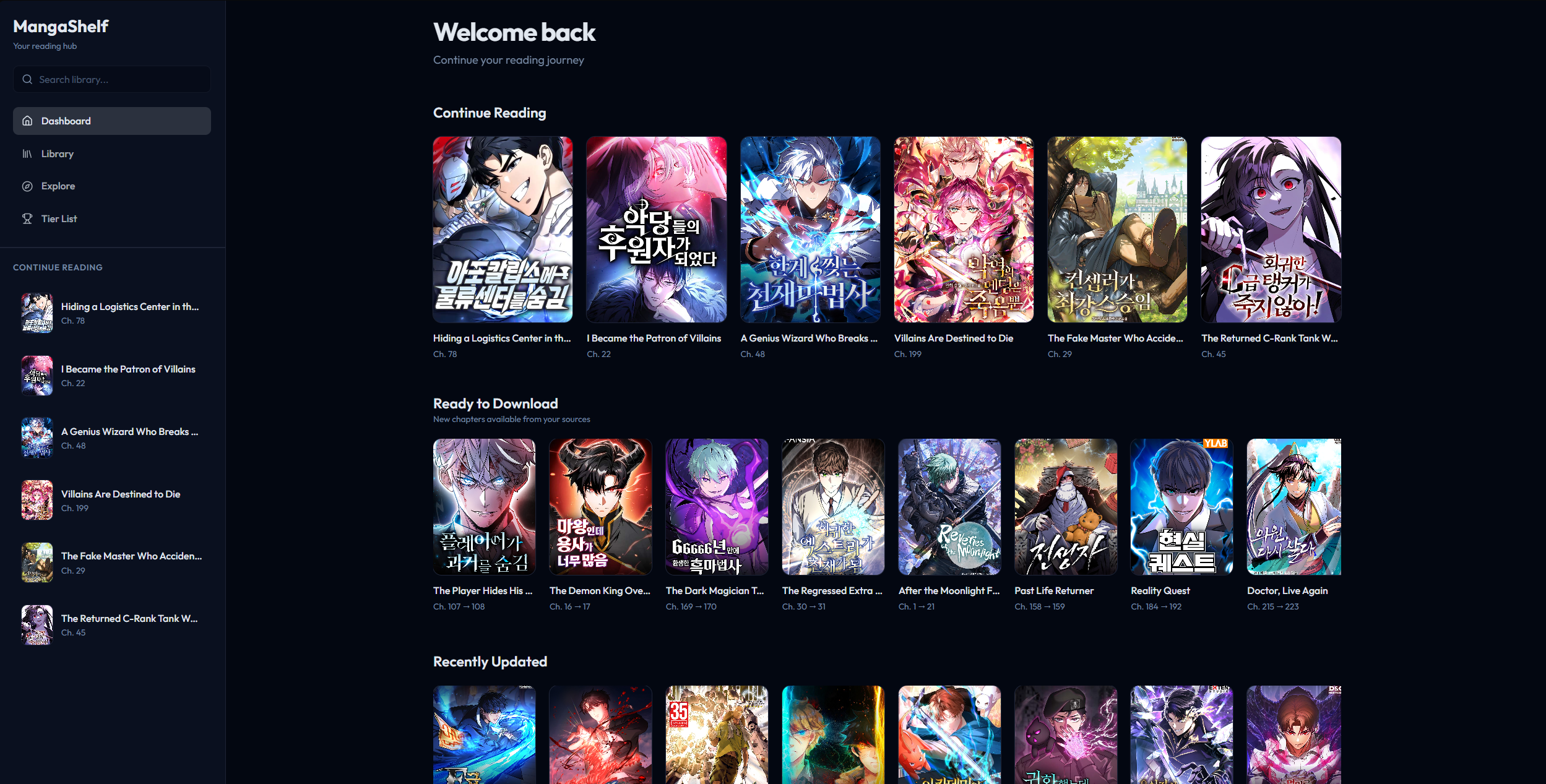
I wanted something stable. A single interface where I could search across sources, track what I'm reading, and not lose my library every time a site goes dark. So I built MangaShelf.
The scraper layer
The core of MangaShelf is its scraper system. There's an abstract BaseScraper class that defines the interface every source has to implement. Search for manga, get a chapter list, extract page images from a chapter. Each source gets its own file extending that base class, handling whatever quirks that particular site has.
Some sources have proper APIs. Some return server-rendered HTML that you parse with Cheerio. Some do both depending on the endpoint. A few require specific referer headers or their image CDN rejects you. One or two encrypt their chapter data and you have to reverse the obfuscation before you can get page URLs out.
At its peak, MangaShelf supported 26 sources. MangaPark, Asura Scans, Flame Comics, Atsu.moe, KaliScan, a bunch of others. Each one has a status tag (working, limited, slow, or down) because the reality of scraping manga sites is that something is always broken. A source that worked fine yesterday might throw Cloudflare challenges today. The app tracks this so you know what to expect.
The scraper registry is centralized. Every source is registered with its metadata, capabilities, and current status. When you search for a manga, you can search a specific source or fan out across all of them. When a source dies, you just flip its status and your library keeps working through the others.
The reading experience
The reader supports two modes. Longstrip is the default for manhwa, where you scroll vertically through the whole chapter as one continuous strip. Page mode is for traditional manga where you flip through individual pages. The app remembers which mode you prefer per series.
During reading, the UI hides itself. No navbar, no sidebar, just the pages. Keyboard navigation works with arrow keys and WASD. The app tracks your reading progress per chapter and auto-cleans downloaded chapters after you've finished them so they don't eat up storage.
Offline and storage
MangaShelf is a PWA. It runs in the browser but installs like a native app, with a service worker handling offline access.
Chapter images get downloaded to the browser's Cache API. You can download chapters ahead of time over WiFi and read them later without a connection. The download manager handles concurrency, tracks progress, and cleans up after itself.
For library data there are two storage backends behind a unified adapter. If you're logged in with Firebase, your library syncs to Firestore. Reading progress, ratings, source preferences, all of it. If you don't have an account, guest mode stores everything in localStorage. I've shared guest mode with a few friends so they can use the app without needing to sign up. The app switches between backends transparently. Same interface, same features, just different persistence layers underneath.
Multi-source per manga
This is the feature that matters most in practice. A single manga can be linked to multiple sources. If Asura Scans goes down, your manga still has chapters available from MangaPark or Flame Comics or wherever else carries it. You're not locked into one source per series.
The app also handles scanlator selection. When multiple groups translate the same series, you can pick which scanlator's chapters you prefer. Some groups are faster, some have better quality, some do different naming conventions. MangaShelf lets you choose.
Title matching across sources is harder than it sounds. The same manga might be listed as "Solo Leveling" on one site, "나 혼자만 레벨업" on another, and "I Alone Level Up" on a third. The app does Unicode-aware normalization (NFKC), slug-based matching, and supports manual aliases for cases where automatic matching fails.
The image proxy problem
Manga sites don't want you hotlinking their images. Most CDNs check the Referer header and reject requests that didn't come from their domain. A browser-based reader running on your own domain will get blocked immediately.
MangaShelf runs an image proxy on Next.js edge functions. The proxy receives the image URL, adds the correct referer header for that source's CDN, fetches the image, and pipes it back to the client with aggressive cache headers. There's a domain whitelist so the proxy can't be abused as an open relay.
Each source has its own referer rules. Some need the exact origin domain. Some need a specific path. Some don't check at all. The proxy handles all of this per-source so the reader component doesn't have to think about it.
The stack
- Framework: Next.js 14 with App Router, TypeScript
- Scraping: Cheerio for HTML parsing, Crypto-JS for sources that encrypt chapter data
- Storage: Firebase Firestore (authenticated) / localStorage (guest mode)
- Caching: Browser Cache API for offline chapter images
- Proxy: Next.js Edge Runtime for image proxying with per-source referer headers
- Deployment: Vercel
What came next
After building and maintaining 26 scrapers inside MangaShelf, I started noticing that the scraper layer was useful on its own. Other projects could benefit from the same multi-source search and chapter fetching without having to rewrite all the parsing logic.
So I pulled the scrapers out and built the Comick Source API, a standalone REST API that exposes the same scraping capabilities as proper endpoints. Search across sources, fetch chapter lists, check source health, get frontpage data. It grew beyond MangaShelf's original 26 sources to over 70, with streaming NDJSON responses for parallel searches and automatic Cloudflare detection.
MangaShelf was the reader. The Comick Source API is the engine underneath it, extracted and generalized so anything can use it.